



Vidyawan Internship Program — Execution Plan
What This Internship Is
Vidyawan is not a certificate program. It is a complete learning experience built for Indian engineering, BCA, and MCA students who want to graduate with skills that actually hold up in a placement interview, a technical round, or a real workplace. Every element of this program — the content, the assessment structure, the progression logic, the downloadable material, the AI-assisted teaching — exists for one reason: to make learning stick.
This document outlines the complete execution plan of the Vidyawan internship so that every student, institution, evaluator, and partner understands exactly what is delivered, how it is delivered, and why the certificate that comes out at the end means something.
Program Architecture at a Glance
| Parameter | Details |
|---|---|
| Duration | 30 Days |
| Mode | Fully Online, Self-Paced with Structured Progression |
| Certification Body | Vidyawan — A Unit of Shiva Tech Innovations |
| Issuing Authority | MSME Registered (UDYAM-WB-14-0205610), ISO 9001:2015 Certified |
| Assessment Type | Multi-Zone Continuous Assessment + Final Level Quiz |
| AI Teaching Assistant | Vidya AI — Embedded, Context-Aware, Real-Time |
| Downloadable Material | Complete Study Notes PDF + Assessment Paper PDF per Level |
| Certificate Verification | QR Code + Unique Certificate ID, publicly verifiable |
| Minimum Task Completion | 2 LinkedIn Project Submissions Required |
| Learning Path | 7-Zone Progressive Learning System per Level |
The Complete Student Journey
Every student follows the same locked, sequential path. No stage can be skipped. Each gate must be genuinely passed before the next opens. This is how we protect the value of the credential.
| Stage | Module | What Happens |
|---|---|---|
| 1 | Dashboard | Student views enrollment status, progress across all levels, task count, and referral data |
| 2 | Course Journey | All levels in the course are displayed with lock and unlock logic. A level opens only when the previous one is completed. |
| 3 | Zone Learning | For every resource inside a level, the student completes all active zones in sequence |
| 4 | Level Quiz | A dedicated MCQ quiz that must be passed before the next level unlocks |
| 5 | Task Submission | Student completes real-world assignments and submits LinkedIn post URLs as evidence of work |
| 6 | Certificate | A verified certificate is generated with the student's name, course, duration, unique ID, and a scannable QR code |
The 7-Zone Learning Path — Detailed Breakdown
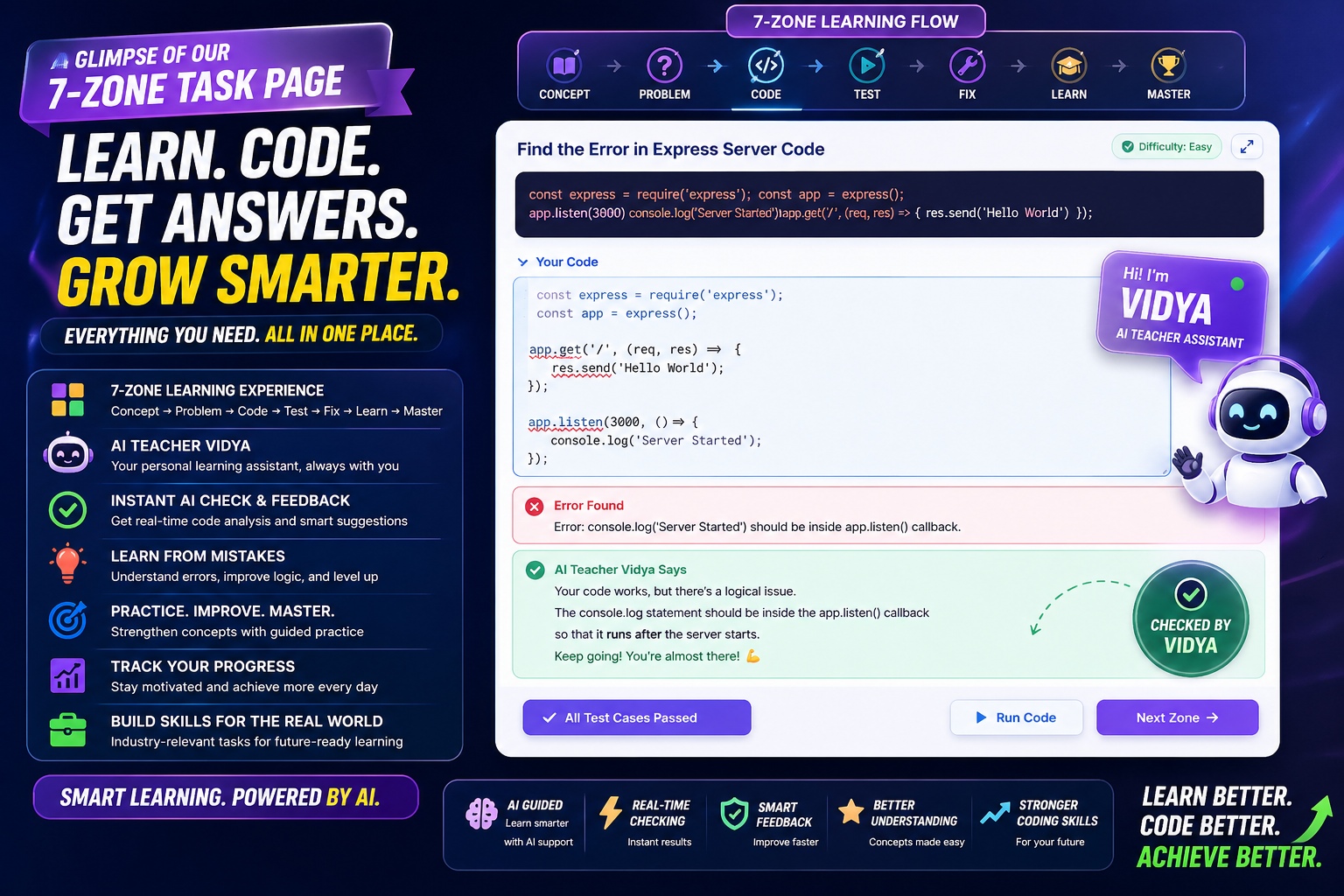
This is the structural backbone of Vidyawan. Every resource inside every level is divided into seven distinct learning zones. Each zone targets a different stage of understanding — from first exposure to long-term retention. Zones unlock in sequence. A student cannot jump ahead.
| Zone | Name | Purpose | What the Student Does |
|---|---|---|---|
| Zone 1 | Understand It | First exposure and comprehension | Reads content broken into focused sections. Each section includes a plain English version for clarity and a real-life analogy. Key terms are listed at the end with definitions. Every section must be marked as read before Zone 2 opens. |
| Zone 2 | See It | Concept applied in practice | Views working examples — either code that runs against real Indian-context problems, or scenario descriptions that show the concept in action. A live compiler is embedded for code examples so students can experiment immediately. |
| Zone 3 | Practice It | Active recall and exercise | Attempts structured exercises: fill-in-the-blank, matching, sequencing, and spot-the-error. Responses are evaluated. A score below 50% triggers a review loop — Zone 1 resurfaces before the student can proceed to Zone 4. |
| Zone 4 | Test Yourself | Knowledge assessment | Answers MCQ, True/False, and Short Answer questions. Short answers are graded in real time by the Vidya AI against a rubric written by the instructor. A full mistake report is generated showing what was correct, what was wrong, and why. |
| Zone 5 | Remember It | Retention and memory consolidation | Works through flashcard pairs. Rates each card as Know It, Almost, or No Idea. Reads key takeaways written as one punchy sentence each — like a senior texting you before your exam. A mnemonic trick is included. Student can write personal notes that are saved. |
| Zone 7 | Connect It | Real-world application | Reads exactly how the concept is applied by a named Indian company and a Did You Know fact specific to the Indian tech context. Always visible — no unlock required. |
| Quiz | Level Quiz | Final level gate | Answers a dedicated question set for the entire level. Passing unlocks the next level and unlocks the downloadable study material and assessment PDF for that level. |
Content Quality — The Vidya Standard
The content inside every zone is written to a defined standard. It is not reproduced from textbooks. It is not generic. It is written for an Indian engineering student sitting in a tier-2 city with a placement interview in three months and a phone full of Zomato and UPI transactions.
| Criteria | What It Means in Practice |
|---|---|
| India-Localised Examples | Every concept connects to platforms students use daily — Zomato, UPI, IRCTC, PhonePe, Blinkit, Zepto, CRED, Groww, Zerodha, Rapido, BookMyShow, Flipkart, Jio |
| Interactive Code | Every code example takes real user input and produces meaningful output. Examples include a Zomato bill splitter, UPI transaction validator, IRCTC PNR simulator, IPL points table sorter, Flipkart EMI calculator, college CGPA calculator, placement CTC calculator |
| Real Indian Data | All sample program runs use Indian names, Indian phone numbers, rupee amounts, and Indian cities |
| Cultural Relevance | Analogies and references drawn from Stree 2, Kota Factory, Scam 1992, Panchayat, The Family Man, 12th Fail, TVF Pitchers, Mirzapur — content students actually remember |
| Language | Clean, simple English that a student from Chennai, Kolkata, Kochi, Bhubaneswar, Guwahati, Hyderabad, and Pune all feel equally at home with. No Hindi or Hinglish — this is all-India content. |
| Length Discipline | Section body maximum 120 words. Plain English version maximum 60 words. Each takeaway maximum 15 words. Flashcard answer maximum 20 words. Short is smarter. |
| Analogy Quality | Every analogy is drawn from something Indian students interact with physically — booking Tatkal tickets at 10am, IRCTC crashing under load, Jio tower coverage, hostel room allocation, Delhi Metro rush hour |
Vidya AI — The Embedded Teaching Assistant
Every resource includes an AI teaching assistant called Vidya, embedded directly inside the learning interface. Vidya is not a general-purpose chatbot layered on top. She is woven into the learning flow and behaves differently depending on which zone the student is currently working in.
| What Vidya Does | How It Helps the Student |
|---|---|
| Zone-Aware Responses | In Zone 1, Vidya explains concepts in fresh ways. In Zone 3, she gives hints without revealing answers. In Zone 4, she grades short answer questions in real time with specific, constructive feedback. The student never needs to leave the learning interface to get help. |
| Text Selection Explain | The student highlights any sentence in Zone 1 content and Vidya instantly explains it differently using a new analogy. This is particularly useful when a student reads a line three times and it still does not land. |
| Short Answer Grading | Vidya grades free-text responses against an instructor-written rubric. She awards a score of 0, 1, or 2 and tells the student exactly what they got right and what they missed — in seconds, not days. |
| Progressive Hints | For spot-the-error exercises, Vidya gives progressively stronger hints over three attempts. The answer is never given immediately. The student is guided toward finding it themselves. |
| Proactive Check-In | If a student stops interacting with the material for three minutes, Vidya automatically offers assistance. Students who are stuck but too hesitant to ask get a nudge at exactly the right moment. |
| Voice Output | Vidya can read her responses aloud. This is useful for students who retain information better through listening, and for those who want to continue learning while away from the screen. |
| Welcome Context | When a student opens a new resource, Vidya automatically introduces the topic with a short, engaging welcome that frames what is about to be learned. |
Assessment Engine — Full Breakdown
Assessment in Vidyawan is not a single quiz at the end. It runs continuously across every zone, at every level, for every resource.
Zone 3 — Practice Exercises
| Exercise Type | How It Is Presented | How It Is Evaluated |
|---|---|---|
| Fill in the Blank | Student fills blanks in a sentence. | Answers checked against stored values. Synonyms, abbreviations, and paraphrases evaluated by Vidya AI for leniency. |
| Matching | Student matches terms on the left to definitions on the right. Options are shuffled on every attempt. | Each correct pair scores one point. |
| Sequencing | Student reorders shuffled steps. Drag-and-drop on desktop. Arrow buttons on mobile. | Each correctly placed step scores one point. |
| Spot the Error — Non-Coding | Student reads a paragraph or logic block with a deliberate mistake and types the correction. | Vidya AI grades the response over up to three attempts with progressive hints. |
| Spot the Error — Coding | Student reads buggy code and submits a correction. A live compiler is available for testing. | Vidya AI compares the student's answer against the stored correct version with progressive hints. |
Zone 4 — Quiz Questions
| Question Type | Structure | Scoring |
|---|---|---|
| MCQ | Four options. Wrong options are crafted to be almost-right — testing genuine understanding, not elimination. Explanation shown after submission with Indian-context reasoning. | 10 XP for correct answer |
| True / False | Binary choice with explanation. | 10 XP for correct answer |
| Short Answer | Student types a free-text response. Vidya grades against an instructor-written rubric and scores 0, 1, or 2 with specific written feedback. | Up to 10 XP based on score |
Adaptive Learning Rules
| Rule | Trigger | What Happens |
|---|---|---|
| Remediation Loop | Zone 3 score below 50% | Zone 1 resurfaces in simplified mode. Zone 4 is blocked until Zone 1 is revisited. Vidya explains why and guides the student back. |
| Proactive Assistance | Three minutes of inactivity | Vidya opens automatically and offers to help |
| Perfect Score Recognition | Zone 4 score of 100% | Confetti launches. Zone Master badge awarded. The achievement is recorded. |
Level Quiz
After completing all resources in a level, the student takes a dedicated level quiz. This quiz covers the entire level — not just the last resource. Passing unlocks the next level and triggers the PDF download unlock for that level.
Downloadable Study Material — What Gets Unlocked
After a student completes all zones in a level and passes the level quiz, two permanent downloadable documents are unlocked for that level. These are not marketing materials. They are dense, structured learning documents that a student can print, annotate, and study from without a screen.
Complete Study Notes PDF
This document compiles the full content of every resource in the level into a single, professionally formatted PDF. It contains everything a student needs to revise the entire level offline.
| Section | What It Contains |
|---|---|
| Cover Page | Course name, level, generation date, resource count |
| Table of Contents | All resources listed in sequence with level and course reference |
| Zone 1 Content | Every section heading and body, plain English version, analogy, and key terms table |
| Zone 2 Examples | All code examples in a formatted code window with filename, all scenario descriptions |
| Zone 3 Exercises with Answers | Every exercise presented in full with the correct answer immediately below — for self-study and revision |
| Zone 4 Quiz with Answers | Every question with all options, correct answer highlighted, and explanation |
| Zone 5 Flashcards | Full flashcard table with front and back columns side by side |
| Zone 5 Takeaways and Mnemonic | All key takeaways and the memory trick |
| Zone 7 Connect It | Real-world application and Did You Know fact |
| Protection | Optional watermark, optional password protection, optional QR code per resource |
Assessment Paper PDF
This is a formal, examination-style paper generated from all Zone 3 exercises and Zone 4 questions in the level. It is structured as a paper a student would receive in an examination hall, complete with an answer key at the end.
| Section | What It Contains |
|---|---|
| Cover Page | Course name, total question count, student name field, roll number field, date field, score field, printed instructions |
| Part A — Practice Exercises | All Zone 3 exercises presented as exam questions with answer spaces. Fill-blank shows blank lines. Matching shows a shuffled Column B with blank answer column. Sequencing shows shuffled steps with numbered boxes for student to write the correct order. Spot-the-error shows the error code with lined answer space. |
| Part B — Quiz Questions | All Zone 4 questions. MCQ shows all four options with a blank answer line. True/False shows two boxes to circle. Short answer shows four lined spaces for a written response. Each question shows a marks box. |
| Answer Key | Complete answer key at the end of the paper — correct answers for every question, matching pairs in order, correct sequence, fill-blank answers, and model answers for short answer questions |
| Score Summary Page | Total questions, Part A count, Part B count, and a student score field |
| Protection | Same watermark and password settings as study notes |
Gamification and Motivation System
| Feature | What It Does for the Student |
|---|---|
| XP Points | Earned for every meaningful action — completing zones, answering correctly, saving notes, rating flashcards. Displayed in real time. Creates a visible record of effort. |
| Badges | Awarded for milestones like completing a resource or scoring 100% on a quiz. Each badge has a title and a description that records the achievement. |
| Daily Streak | System tracks consecutive days of activity. Milestones at every seven days reinforce the habit of showing up consistently — which is the single most important predictor of whether a student finishes. |
| Progress Bar | Zone-by-zone and level-by-level progress is visible in the sidebar at all times. Students always know exactly where they stand and what remains. |
| PDF Unlock as Reward | Study notes and assessment paper unlock only after all zones are completed and the quiz is passed. This turns the downloadable material into something earned, not something handed out. |
Task Submission and LinkedIn Integration
After completing all levels, the student completes real-world assignments. These tasks require applying what was learned and publishing the output publicly on LinkedIn — creating a verifiable, visible record of the student's work.
| Parameter | Details |
|---|---|
| Task Types | Basic tasks requiring a LinkedIn post URL, and detailed tasks with full rich-text instructions on a dedicated task page |
| Minimum Requirement | At least 2 LinkedIn post URLs must be submitted before the certificate is released |
| Submission Tracking | Real-time progress bar shows how many tasks have been filled. Submit button activates only when the minimum is reached. |
| LinkedIn Caption | After certificate generation, a pre-written caption with course name, hashtags, and Vidyawan tagging is provided for the student to copy and post immediately |
| Verification Chain | The LinkedIn posts, the certificate ID, and the QR verification page together create a three-point verifiable record of completion |
Certificate — Structure and Verification
| Field | Value |
|---|---|
| Student Name | Full registered name, printed in uppercase |
| Course Name | Exact course title, printed in uppercase |
| Duration | Enrollment date to enrollment date plus 30 days |
| Certificate ID | Unique hash generated from name, course, and start date — format CERT-XXXXXXXXXXXX |
| QR Code | Links to the public verification page at vidyawan.in/verify-certificate.php — scannable by any recruiter, institution, or employer |
| Issuing Organisation | Shiva Tech Innovations |
| MSME Registration | UDYAM-WB-14-0205610 |
| Quality Standard | ISO 9001:2015 |
| Download Formats | High-resolution JPG and PDF |
| LinkedIn Share | Pre-written caption auto-generated with course name, ready to copy and publish |
How Vidyawan Is Different
| Dimension | Standard Online Internships | Vidyawan |
|---|---|---|
| Content | Generic global examples copied from documentation | Every concept taught through Indian brands, Indian cities, Indian names, rupee amounts, and current Indian tech context |
| Code Examples | Static snippets with no input or output | Fully interactive programs that take real user input and solve Indian real-life problems |
| Teaching Support | None or a generic chatbot unconnected to the material | Vidya AI embedded inside every resource, zone-aware, rubric-based, giving specific feedback on every short answer in real time |
| Assessment | A single quiz at the end of the course | Continuous multi-zone assessment with adaptive remediation, mistake reports, and a dedicated level quiz |
| Progression | Linear with no enforcement | Strict sequential unlock — every zone and every level gates the next |
| Short Answer Grading | Manual or absent | Real-time AI grading with specific, constructive written feedback within seconds |
| Downloadable Material | A certificate PDF | A complete study notes document and a formal assessment paper with answer key — both unlocked as a reward for genuine completion |
| Certificate Verification | PDF with no verification mechanism | QR code linking to a live public verification page, plus a unique certificate ID |
| Cultural Relevance | None | Content written for the student who watches Kota Factory, uses IRCTC at 10am for Tatkal, and checks their placement eligibility on Linkedin every Sunday |
Issuing Organisation
Vidyawan is a product of Shiva Tech Innovations, a government-recognised MSME and ISO 9001:2015 certified organisation headquartered in West Bengal, India.
| Detail | Value |
|---|---|
| Organisation | Shiva Tech Innovations |
| Brand | Vidyawan |
| MSME Registration | UDYAM-WB-14-0205610 |
| Quality Standard | ISO 9001:2015 |
| Certificate Verification | https://vidyawan.in/verify-certificate.php |
Why Our Certification Holds Weight
100% Original Content
No curated links. Every module is custom-built using real Indian operations and platforms such as Zomato, UPI, IRCTC, Flipkart, PhonePe, BookMyShow, Jio, Netflix, and Zerodha. Learners work on practical scenarios that reflect how modern businesses and digital services operate in the real world.
Zero-Setup Native Coding
Write, run, and test your code directly within the Vidyawan platform. No external software, complex installations, or additional tools are required, allowing you to focus entirely on learning and building.
AI-Powered Gatekeeping
Our advanced AI assessment layer evaluates your responses, provides real-time feedback, and verifies your understanding before allowing progression to the next stage. This ensures genuine learning rather than passive completion.
The Mastery Loop
A structured and mandatory learning progression designed to build true competency:
Read → Practice → Apply → Demonstrate
Each stage must be completed successfully before moving forward, ensuring that knowledge is understood, applied, and proven through performance.
![Official Referral Program Notice [UPDATED] – Vidyawan Event](admin/events/event_1777536289_7077.png)